How to easily delete your account from the app or website in 5 simple steps
Introduction to Account Deletion
These days, many users are looking for a quick and hassle-free way to delete their account from the app or the web version. Whether for privacy reasons, lack of use, or simply because they want to start over, deleting an account should be a clear, transparent, and secure process.
In this guide, we explain step by step how to do it from both the mobile app and the web version, using simple and straightforward language. We also include important recommendations to ensure you don’t lose valuable information in the process.
Why do users decide to delete their accounts?
There are many reasons why someone might decide to delete their account. Some of the most common include:
- Privacy concerns.
- Lack of app usage.
- Too many notifications.
- Switching to another platform.
Understanding these reasons helps improve the user experience and provide more intuitive processes.
Things to consider before deleting your account
Before proceeding, it is important to keep a few key points in mind.
Data loss
When you delete your account, you will lose all associated information, including:
- Activity history
- Personal data
- Saved settings
Cancellation of services
If you have active subscriptions, they may be automatically canceled or require additional steps.
Tip: Be sure to download or save any important information before continuing.
Step-by-step guide to deleting your account from the App
Deleting your account from the app is a simple process if you follow these steps correctly..
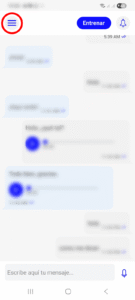
☰ Access the hamburger menu
First, open the app and look in the top-left corner. There you’ll find the menu icon (also known as the hamburger menu).
Click on it to display the available options.
.
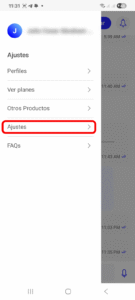
Go to Settings
In the menu, select the Settings option. This is where all your account settings are located.
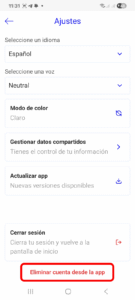
Find the “Delete Account” option
Scroll to the bottom of the screen. There you’ll find the “Delete Account” option.
This step is crucial, as it’s usually placed at the bottom to prevent accidental deletions.
.
Confirmation via modal
When you click “Delete Account,” a pop-up window (modal) will appear.
In this box, you must type exactly: “permanently delete”
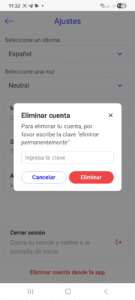
This serves as an additional confirmation to ensure that you really want to delete your account..
Complete deletion
Once you’ve entered the text correctly, click the Delete button.
That’s it! Your account will be permanently deleted.
How to delete an account from the web version
If you prefer to do it from your browser, the process is just as simple, although it involves an extra step in the side menu:
- Expand the left-hand side menu.
- Once you’ve logged in to the web version, go to the menu on the left side of the screen.
- At the bottom of this menu, you’ll see some drop-down arrows (as shown in the image). Click them to expand the menu. After expanding the menu, select the Settings option.
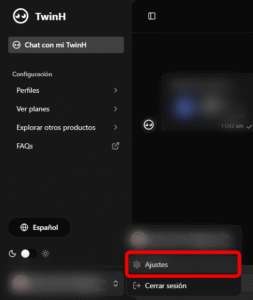
This section contains all your account settings. In Settings, follow the exact same steps as in the mobile app:
- Scroll to the bottom.
- Click “Delete Account”.
- A pop-up window will appear. Type “permanently delete”.
- Click the “Delete” button.
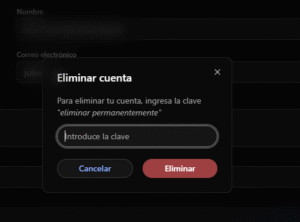
💡 Tip: This extra step in the drop-down menu is important, since advanced options are often hidden to keep the interface clean.
Avoid these common mistakes:
- Entering the confirmation phrase incorrectly.
- Failing to review important information before deleting.
- Attempting to delete while not logged in.
Frequently Asked Questions (FAQs)
1. Can I recover my account after deleting it?
No, deletion is permanent and cannot be undone.
2. How long does it take to delete the account?
It usually happens immediately, although some systems may take a few hours.
3. What happens to my personal information?
They are deleted in accordance with the platform’s privacy policies.
4. Do I need an internet connection to delete my account?
Yes, you need to be connected.
5. Can I delete my account without logging in?
No, you must log in to your account to delete it.
Conclusion
Knowing how to delete your account from the app or the web version is essential for maintaining full control over your digital information. As you’ve seen, the process is simple, but it requires careful attention at every step to avoid mistakes.
By following this guide, you can delete your account quickly, securely, and hassle-free. Always remember to review your information before making this final decision.
Related posts